
Exness Account Verification: Requirements and Process
Verify your Exness account in Tanzania with our step-by-step guide. Complete KYC requirements, upload documents, and start trading today.
 Complete verification without delays:
- Open an Exness account step by step
- Exness account types and requirements
- Exness deposit methods explained
- Exness withdrawal time and processing
- Exness minimum deposit requirements
Exness account verification in Tanzania: what actually matters
Account verification on Exness is the step that turns a newly opened profile into a usable trading account. For traders in Tanzania, this usually means confirming contact details first, then submitting identity and address documents that match the information in the Personal Area.
In practice, the process is less about “unlocking perks” and more about compliance, withdrawals, and account security. A profile with missing or mismatched details can work for basic access at first, but real-money use is usually limited until the checks are completed. That matters if you plan to deposit, trade live, or withdraw to a bank card, mobile-friendly payment method, or another supported channel.
| Verification step | What is usually needed | Typical review time | What it affects |
|---|---|---|---|
| Email confirmation | Working email address | A few minutes | Basic account access |
| Phone confirmation | Tanzanian mobile number | 2–5 minutes | Extra account security, profile progress |
| Identity check | Government-issued photo ID | Up to 24 hours in many cases | Live account use and withdrawals |
| Address check | Recent proof of residence | 24–48 hours in many cases | Fewer account restrictions |
How the verification stages affect trading access
Not every stage carries the same weight. Email and phone confirmation are usually quick, but they do not replace full KYC. The real checkpoint is identity verification, because that is where the platform compares your profile details with official documents.
- Email confirmation helps activate the account and receive service notifications.
- Phone verification adds a second contact layer and can help with login recovery.
- Identity verification is the main requirement for broader live trading access.
- Proof of address is often needed for a fully operational profile and smoother withdrawals.
Many traders only notice the importance of this sequence when they try to withdraw for the first time. A partially completed account can feel fine at the start, then suddenly run into review requests when money movement begins.
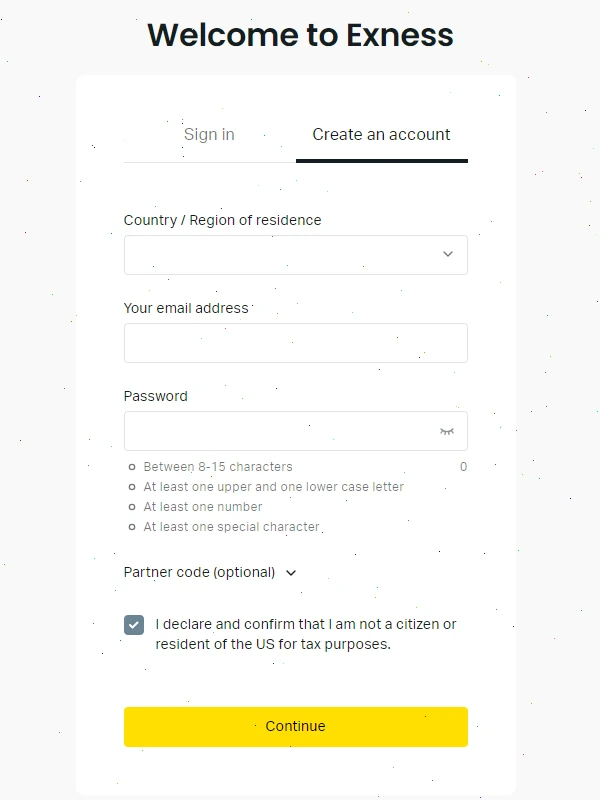
Documents commonly used by Tanzanian residents
For users in Tanzania, the most straightforward route is to submit a valid government-issued ID and a recent address document with the same name shown in the account profile. The platform normally checks three things first: whether the document is current, whether the image is readable, and whether the information matches what you entered during registration.
A National ID is often the easiest option because it is widely used and usually contains the exact identity details required for KYC. Passports and driving licences may also be accepted if the image is clear and the document has not expired.
Identity documents that are usually accepted
Accepted options can vary by account status and compliance review, but Tanzanian users often prepare one of the following:
- National Identity Card
- Tanzanian passport
- Driving licence
- Other officially issued identity documents when specifically requested
It helps to use the document where your full name appears exactly as entered in the profile. Even a small spelling difference can trigger manual review. That sounds minor, but it is one of the more common reasons for delays.
Proof of address: what usually works
For address verification, the document should normally be recent, show your full name, and include the residential address clearly enough to read without zooming. In Tanzania, users often rely on utility records or bank statements because they are easier to validate than informal documents.
- Electricity bill
- Water bill
- Bank statement
- Mobile service bill, where accepted
- Official government correspondence
As a rule, screenshots, edited files, hotel receipts, and temporary accommodation papers tend to cause problems. Even when the address is genuine, the format may not meet compliance standards.
How to verify an Exness account step by step
The process itself is fairly direct. You log in, open the verification section in the Personal Area, and complete the required checks one by one. Most of the friction comes from document quality rather than from the interface.
On desktop, the upload flow is usually easier if you already have scans or PDF files saved. On mobile, it is convenient for quick photos, which is how many Tanzanian users handle it, but the risk of blur, glare, or cropped edges is higher.
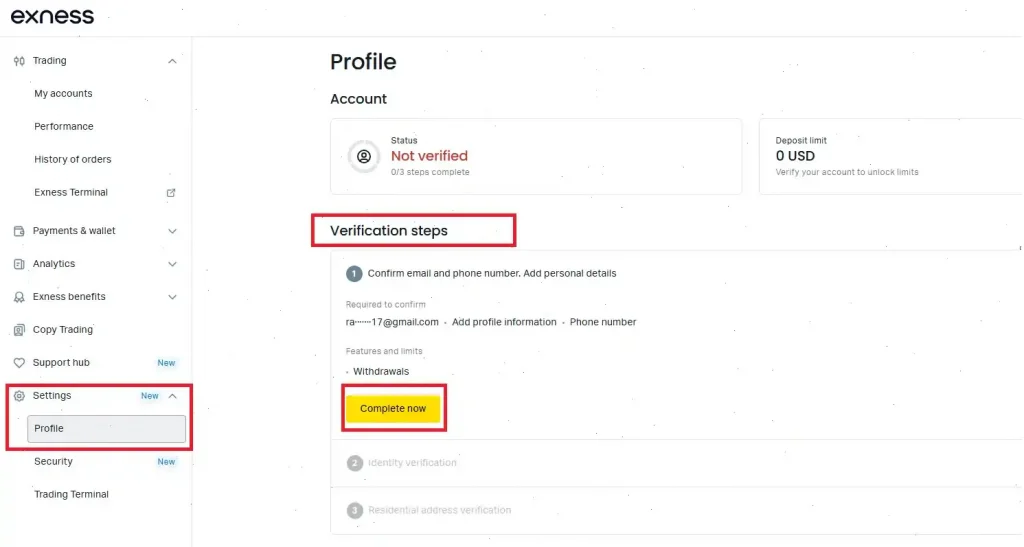
Email confirmation
After registration, open the email sent to your inbox and confirm the address through the provided link or code. If the message does not appear quickly, it is worth checking spam or promotions folders before trying again.
This step looks simple, but it matters later. Verification updates, security alerts, and withdrawal-related notices are often sent there, so using an active address is more important than people think.
Phone verification
Enter your mobile number in the correct Tanzanian format, usually with the +255 country code, then request the SMS code. Once the code arrives, enter it within the allowed time window.
- Use a number you can access without delay.
- Make sure the SIM is active and receiving SMS.
- Check the country code carefully before submitting.
- Retry only after the timer resets if the first code fails.
Users on Vodacom, Airtel, Tigo, or Halotel usually go through this stage without much trouble, though message delays can still happen during network congestion or roaming.
Uploading documents without getting rejected
Most rejected submissions come down to presentation. The document itself may be valid, but the uploaded image is too dark, one corner is missing, or the text cannot be read properly. Compliance teams are not judging the quality of your camera — they just need a file they can verify with confidence.
| Document category | Common file types | What reviewers look for | Frequent issue |
|---|---|---|---|
| ID document | JPG, PNG, PDF | Sharp text, full edges, visible photo | Blur or cropped corners |
| Proof of address | JPG, PNG, PDF | Recent date, full name, clear address | Date or address not visible |
| Additional request files | JPG, PNG, PDF | Unedited, readable, complete | Screenshot instead of original-style file |
What a good upload looks like
Use even lighting and place the document on a flat surface. Avoid shadows from your hands or phone. If you are taking a picture, capture it from directly above rather than at an angle. All four corners should be visible, and reflections from plastic covers should be removed before the shot.
There is also a practical point here: high resolution helps, but oversized files do not automatically improve approval chances. A clean, readable image usually performs better than a huge file with glare or motion blur.
How long Exness verification takes in Tanzania
Verification times are not always identical from one account to another. Some identity checks move through within a few hours, while others take closer to a full business day. Address checks can take longer, especially if the file needs manual review.
A reasonable expectation for many users is same-day review for straightforward identity documents and up to two days for a full account check. That said, weekends, public holidays, or spikes in submission volume can stretch the timeline.
Why some accounts are approved faster
Clear documents, exact profile matching, and standard proof-of-address files tend to move faster. The system has less to question, so the review is smoother. On the other hand, if your ID spelling differs from the profile or the address document looks incomplete, the check may pause for additional review.
Common causes of delay
- Name or date of birth does not match the profile
- Expired identification document
- Address document is older than the accepted period
- Low-quality image or missing document edges
- High submission volume during busy periods
In practice, fixing the file and resubmitting it quickly often works better than sending repeated messages to support right away. A corrected upload usually resolves the issue faster than a long explanation.
If verification fails, here is where to look first
A rejection does not necessarily mean the account has a serious problem. Quite often, it means the reviewer could not validate one important detail. The notification usually points to the reason, and that message is worth reading carefully before uploading anything again.
When profile details and documents do not match
This is one of the more sensitive issues because identity data affects both compliance and withdrawals. If your profile shows a shortened name, old surname, or different spelling from the ID, the review may stop until the details are corrected.
Where the difference is legitimate — for example, a recent change in personal details — additional supporting documents may be requested. It is better to submit accurate information once than to keep changing fields without explanation.
Alternative cases and manual review
Some users do not have the standard combination of documents available at the moment. In those cases, the platform may request alternative records or a manual compliance check. This is not guaranteed, and acceptance depends on the document type and the reason it is being submitted.
| Problem | What it usually means | Best next step | Possible review time after resubmission |
|---|---|---|---|
| Document rejected | Image or format issue | Retake and upload a clearer file | Up to 24 hours |
| Data mismatch | Profile does not match ID | Correct profile details or provide supporting proof | Several hours to 1 day |
| Address not accepted | Document too old or incomplete | Upload a newer full-page address file | 1–2 days |
| Pending too long | Manual review or queue delay | Check status, then contact support if needed | Varies |
What changes after the account is fully verified
Once verification is complete, the account generally becomes easier to use in a normal trading routine. That can include fewer withdrawal-related interruptions, broader access to trading functions, and better account stability from a compliance standpoint.
This does not remove trading risk, of course. Verification is an account requirement, not a performance advantage. Still, many traders prefer to complete it early because it reduces the chance of administrative friction later, especially when real funds are involved.
- Smoother access to deposits and withdrawals
- Broader use of live trading functions
- Fewer restrictions tied to incomplete KYC
- Improved account recovery and security checks
- More predictable support handling for account-related requests
For Tanzanian users, this is especially relevant if the account is managed mainly on mobile. People often register quickly on a phone, start exploring the platform, and postpone document checks. That works only up to a point. When trading or withdrawing becomes the priority, unfinished verification can slow everything down.
Security, compliance, and the risk side of verification
Verification exists partly to satisfy AML and KYC rules, but it also protects the user. A verified account is easier to defend in cases involving login recovery, withdrawal review, or suspicious activity checks. Without verified identity data, resolving those issues can become messy.
That said, users should still be cautious. Upload documents only through the official Exness website or app, and avoid sending sensitive files through unofficial chat links or third-party pages. A lot of problems blamed on “platform verification” actually start with users sharing documents in the wrong place.
Why this matters for real-money trading
Trading is a YMYL area, so the account review process should not be treated as a formality. If you plan to use leverage, fund a live account, or move money in and out regularly, your identification details need to be accurate from the beginning. Otherwise, the issue often appears at the worst time — during withdrawal, not during signup.
Many traders focus on spreads, instruments, or platform speed first. Those things matter, yes, but none of them help much if the account later gets held for document review. Boring as it sounds, getting verification right early is part of risk management too.
 FAQ
FAQ
How do I verify my Exness account in Tanzania?
Log in to your Personal Area, confirm your email and phone number, then upload a valid ID and a recent proof of address. Make sure the profile details match the documents exactly before submission.
Which documents can Tanzanian users usually submit?
A National ID, passport, or driving licence is commonly used for identity verification. For address verification, users often submit a utility bill, bank statement, or other recent official document showing their full name and residential address.
How long does verification normally take?
Many identity checks are reviewed within the same day, while full verification can take up to 48 hours in routine cases. Delays are more likely when the image quality is poor or the details do not match.
Why was my document rejected?
The usual reasons are blurry photos, missing corners, expired documents, old proof-of-address files, or a mismatch between the profile and the submitted document.
Can I use the account before full verification?
You may be able to access the platform and complete some basic steps, but full live-account functionality and withdrawals are generally tied to successful verification. That is why most users finish KYC before relying on the account for regular trading.